


Wedding Guest List. WedGuest
0.00.00 Reviews
App Specs
- Version
- 1.0.0
- Updated On
- License
- Free
- Downloads
- 50,000+
- Developer
- wediweb
- Categories
- Events
- Platform
- Android, iOS
Screenshots

 Analysis by AppCompare
I approach wedding guest planning as a series of small decisions rather than one giant list: who belongs on it, which parts of the day each person is invited to, and how to keep everyone informed when plans shift. That is the problem WedGuest is meant to help with. It is an events app from wediweb, focused on keeping wedding guests and related planning details together. I find that focus useful when the guest list is the main source of stress, though it is worth remembering that an app can organize decisions without making them for you.
Start with a list you can actually maintain
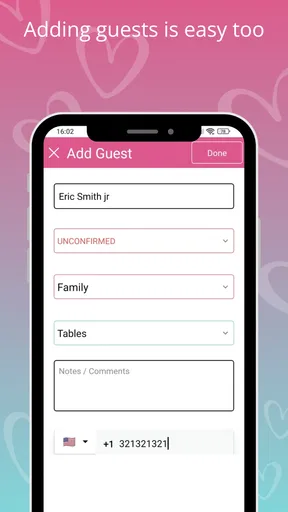
My practical starting point would be to create the event and add guests in manageable batches, rather than trying to enter every name in one sitting. WedGuest can import contacts from a phone, which gives you a quicker starting list than copying names by hand. I would still review every imported entry before treating it as an invitation: a saved contact is not necessarily someone who should receive an invite, and a familiar name may need a partner or family member considered alongside it.
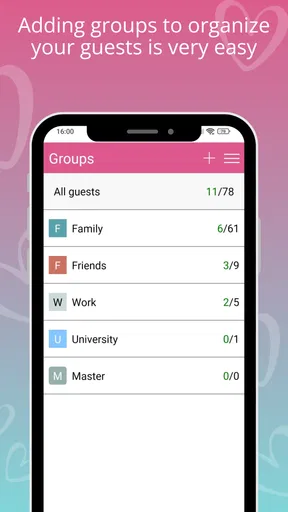
Once names are in place, the family, friends, and colleagues categories offer an uncomplicated first pass. Custom tags are more useful when the decisions become specific. For example, I would use a tag to distinguish ceremony invitations from reception-only invitations, then check that distinction before sending anything. That small habit can prevent a broad category such as “friends” from hiding different plans for different people.
Use the overview to catch list drift
The guest summary is most helpful as a checkpoint, not as a scorecard. Counts for invitations and replies, together with the category breakdown, can reveal that one side of the family has grown while another group is still undecided. I would check it after each meaningful round of edits, especially before committing to venue or catering numbers. A total on screen is only as dependable as the list behind it, so I would keep tentative names clearly separated in my own process rather than assuming every entry is a firm yes.
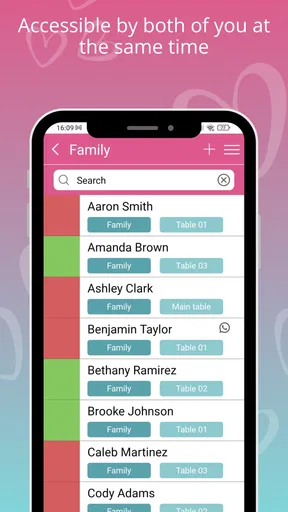
RSVP tracking also works best when the list is treated as the shared record of truth. If a guest replies by phone or in person, I would make a point of updating the app promptly instead of relying on memory or leaving the answer in a message thread. That routine matters more than checking the dashboard repeatedly: a current list helps avoid chasing someone who has already responded, and makes it easier to see who still needs a polite reminder.
Choose communication deliberately
WedGuest’s in-app messaging and invite templates can reduce the effort of sending routine updates. I would use a template as a starting point, then read the final message as if I were the guest receiving it. Names, timing, and the difference between ceremony and reception details deserve particular attention. A message that is easy to send is not automatically clear, and wedding information often gets forwarded or read quickly on a phone.
For a venue change or another time-sensitive update, having messages and guest planning in one place can be more convenient than switching between a spreadsheet, email, and several group chats. Still, I would avoid assuming every guest checks the same channel. For important changes, it is sensible to confirm that the people affected have actually received the information, using whatever contact method is appropriate for them.
Worth Reading Before You Choose

Flipboard Shows What News Apps Must Do Beyond the Feed

Switching to Android Auto Means Rethinking Your Driving Routine

Google Calendar Makes a Crowded Week Easier to Manage

Ludo King Makes the Most of the Minutes Between Plans

Baby Panda World Brings Quick Play to Modern Phones, but Its Game Library Feels Busy

ESPN’s Live Game View Makes Following Close Games Easier
Put the extra tools to work at the right time
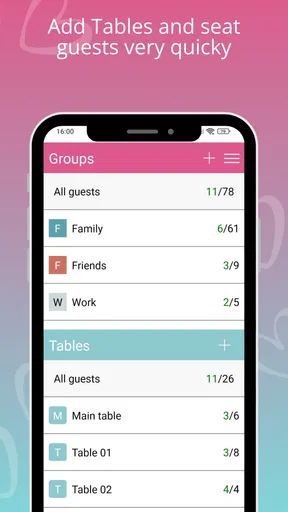
The seating planner is suited to the stage when attendance is taking shape and table decisions are becoming real. Its drag-and-drop arrangement makes it easy to try alternatives, but I would treat those layouts as drafts until replies settle. A simple working rule is to make changes only when there is a reason—such as accommodating a family group or keeping guests with someone they know—rather than moving people around endlessly because the screen makes it tempting.
The budget tracker can sit alongside that work, but I would not treat a guest-list app as a complete financial plan. It can help keep an eye on wedding costs, yet the numbers are useful only if expenses are entered consistently and the budget reflects the couple’s actual commitments. I would use it as a running check, then keep any contracts, receipts, or detailed payment arrangements in the places they already belong.
Where it fits, and where I would look elsewhere
WedGuest makes the most sense for a couple or a designated helper whose immediate need is to coordinate people: build a list, sort guests, watch replies, send updates, and later think through seating. Compared with a basic spreadsheet, its focused guest workflow and event messaging can reduce manual switching. A spreadsheet may still be better for people who want complete control over columns, formulas, or a highly customized planning system. Likewise, someone already using a wedding-planning service for every task may prefer not to maintain a second source of guest information.
I would also pause before relying on any one app as the only communication record when several relatives are helping. Agree who is responsible for entering replies and editing names; otherwise, two people can work from different versions of the plan. That is a process limitation rather than a reason to avoid the app, but it is easy to overlook when a shared task feels simple at first.
Getting Started with WedGuest
The first thing you’ll notice about WedGuest is its super intuitive interface. Setting up your account is a piece of cake. Just download the app, sign in, and you’re greeted with a clean, straightforward dashboard. It’s like the app is saying, “Relax, I’ve got this.”
Once you’re in, you can create a new event and start adding guests. The app allows you to import contacts directly from your phone, which saved me a ton of time. No more cross-referencing spreadsheets and contact lists!
Managing Your Guest List
Organizing guests is where WedGuest truly shines. You can categorize guests by family, friends, or colleagues, and even add custom tags. This came in handy when I needed to differentiate between those who get an invite for the ceremony and those who are just in for the reception. The app also lets you track RSVPs effortlessly. As soon as someone responds, the app updates automatically. It’s like having your own personal assistant.
For those who love stats, WedGuest offers a neat summary of your guest list. You can see the total number of invites sent, RSVPs received, and even get a breakdown by category. It’s a data lover’s dream!
Communication Made Easy
One of the standout features is the integrated messaging system. You can send out invites, reminders, or any updates directly through the app. I found this particularly useful when a venue change required a quick update to all my guests. No more mass emails or group texts; it’s all in one place!
WedGuest also offers customizable templates for your invites. You can add a personal touch without the hassle of designing from scratch. It’s a small feature, but it makes a big difference.
Extra Bells and Whistles
If you’re like me and love a bit of extra functionality, you’re in luck. WedGuest includes a seating planner that lets you arrange tables and assign seats. It’s a drag-and-drop system, so you can easily shuffle people around until you find the perfect arrangement. I spent way too much time playing with this feature, but hey, it’s fun!
Another nifty tool is the budget tracker. Weddings can get pricey, and this feature helps you keep an eye on costs. You can set your overall budget and track expenses as you go. It’s a great way to avoid any nasty surprises.
What to check before the busy stretch
Before sending a batch of invitations, I would review the event details, the intended guest groups, and the wording in each template. The most useful check is not whether the message looks polished, but whether each recipient is being told the right version of the plan. If ceremony access differs from reception access, verify the relevant tags and recipient selection together. That extra pause is especially worthwhile when the guest list has changed since the first draft.
I would also decide how the couple wants to handle replies that arrive outside the app. A family member may call one partner, while another guest responds in person to a relative. Pick one person to enter those answers, or agree on a simple handoff, so the RSVP overview does not lag behind real life. This is a low-tech habit, but it is the difference between a useful summary and a misleading one.
A realistic planning rhythm
Imagine a couple reviewing the guest list over a week of ordinary evenings. One partner imports contacts and removes names that are no longer under consideration; the other checks the family and colleague groups, adding tags for the different parts of the celebration. They send invitations after reviewing the message, then return to the RSVP view when replies begin to arrive. If a guest calls with an answer, they record it while the conversation is fresh. Later, they use the seating planner to test a layout, leaving it provisional until attendance is clearer.
That rhythm is where I see the app being most helpful: it turns a scattered set of decisions into a repeatable routine. Rather than expecting one session to solve everything, use it as the place to make a change, record the reason, and check the effect on the list. This is also a good way to avoid treating an early seating arrangement or headcount as final when the underlying replies are still changing.
Settings, costs, and practical expectations
WedGuest is free to install, is rated for Everyone, and has a 0.0 average rating at present, so I would judge it by whether its workflow suits your plans rather than by a rating score. The app is at version 1.0.7, supports Android 7.0 and up, and has passed 10K+ installs. In-app purchases are listed at $2.99 per item. I would check the purchase details in the app before buying anything, and decide whether the core guest-list process already covers what you need.
For compatibility, the stated minimum operating system is useful if you are setting up an older Android phone for a relative who will help manage the list. It does not answer every device-specific question, so I would check the app’s store page on the phone you plan to use before building your process around it. If you are coordinating with someone on a different platform, agree in advance how you will share updates rather than assuming both people will use the same setup.
One practical trade-off is that convenience can encourage overconfidence. Contact import saves typing, but it does not decide who belongs on the guest list. Automated RSVP updates are helpful when a reply arrives through the app, but an answer given elsewhere still needs a human to keep the record current. The app can reduce clerical work; it cannot replace clear decisions about plus-ones, family expectations, or invitation boundaries.
Who will get the most from it
I would recommend WedGuest to couples who want a wedding-specific place to organize guests and who are comfortable keeping a digital list current. It is also a sensible option for a friend or family member taking on guest coordination, especially when the couple wants that helper to work through categories, messages, and seating rather than juggling separate tools for each step.
I would skip it if your list is already stable in a system everyone uses, if you need a broad project-management workspace for vendors and timelines, or if your planning depends on extensive custom calculations. In those cases, a spreadsheet or a more comprehensive planning tool may be a better fit. The key question is whether guest management is a distinct problem for you. If it is, WedGuest’s focused approach is more appealing; if it is not, adding another place to maintain information may create more work than it saves.
All in all, WedGuest is a lifesaver for anyone planning a wedding. It’s packed with features that genuinely make guest management easier, from organizing and communicating to planning and budgeting. The app is user-friendly and does a fantastic job of taking the stress out of one of the most challenging aspects of wedding planning.
Whether you’re a bride, groom, or the designated wedding planner, give WedGuest a try. It’s like having a virtual wedding planner in your pocket, and who wouldn’t want that?
My verdict after weighing the workflow
I like WedGuest most when it has a clearly defined job: keep guest details, invitation groups, replies, and seating decisions moving in one organized routine. Its strongest advantage is not that it eliminates every planning task, but that it can make guest-related follow-up less scattered. The trade-off is that careful setup and steady updating still matter, and couples who want one tool for every wedding decision may find a guest-focused app too narrow.
If you try it, I would begin with a small, representative group of guests and test the categories, tags, and message process before building out the full list. That gives you a chance to settle on a naming and tagging habit before the list becomes busy. For me, that is the most reliable route to getting value from it: use the features deliberately, keep one agreed record, and let the app handle organization without expecting it to make personal decisions on your behalf.
Pros
- User-friendly interface with intuitive controls.
- Customizable guest categories and tags.
- Real-time guest count updates.
- Integration with popular calendar apps.
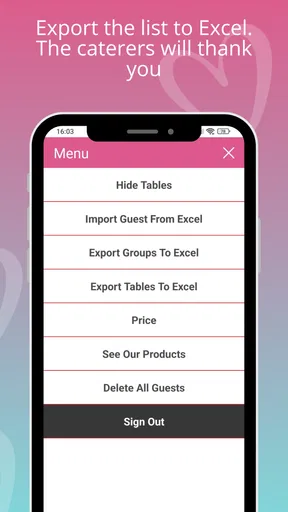
- Data export available for easy sharing.
Cons
- Limited free version features.
- No offline mode available.
- Occasional sync issues with contacts.
- Ads can be intrusive in free version.
- Lacks advanced seating arrangement tools.
FAQs for Wedding Guest List. WedGuest
What is the main purpose of the WedGuest app?
The WedGuest app is designed to help couples efficiently manage their wedding guest lists. It offers features such as RSVP tracking, guest categorization, and seating arrangement planning. By using this app, couples can streamline the invitation process and ensure that all guest-related details are organized and easily accessible.
Is the WedGuest app available on both Android and iOS platforms?
Yes, the WedGuest app is available for download on both Android and iOS devices. Users can find it on the Google Play Store for Android and the Apple App Store for iOS. This ensures compatibility with a wide range of smartphones and tablets, making it convenient for most users.
How does the RSVP tracking feature work in WedGuest?
The RSVP tracking feature in WedGuest allows users to send digital invitations and monitor responses in real-time. Guests can easily respond through the app, and their replies are automatically updated in the system. This feature helps couples keep track of who is attending, making planning more efficient and reducing manual data entry.
Can I customize the invitations sent through WedGuest?
Absolutely! WedGuest offers customizable templates for invitations, allowing users to add personal touches such as colors, fonts, and images. This ensures that each invitation reflects the unique style of the wedding, providing a personalized experience for guests from the very first interaction.
Does WedGuest offer support for seating arrangements?
Yes, WedGuest includes a seating arrangement tool that helps users plan where guests will be seated during the wedding reception. The app allows for easy drag-and-drop functionality, making it simple to adjust seating plans as needed. This feature helps ensure that seating arrangements are organized and can accommodate any last-minute changes.


